Showing posts with label Reminders. Show all posts

Tuesday, April 24, 2018

Policies – Spring 2018


Hello Student Assistants,

We have listed a couple of reminders for you all as we have noticed that some of these instructions/policies have been overlooked or not fully understood. We will be reinforcing these policies and stress that failure to comply with these requirements shall be grounds for disciplinary action up to and including termination.:
  •          Keep eating and drinking at the Circulation Desk to a minimum – especially food that may be smelly or noisy. Food must be put away when a patron is approaching the desk. Food may be stored in the Circulation Office’s refrigerator and can be eaten in the Circulation office or the break room. Be sure to clean up your area once you have finished eating.
  •          You may keep phones at the desk, but if you receive a phone call, take it in the Circulation office and keep the conversation short (no longer than 2-3 minutes). Keep personal calls to a minimum and do not take personal calls at the Circulation desk.
  •          Do not leave the circulation desk for an extended period of time without permission. Please let us know if you are leaving to shelf read, take a phone call, take a restroom break, etc. so that we are aware that the desk will be unattended. Also, we must know this for safety reasons.
  •          Do not wear earbuds/earphones at the Circulation desk. You may wear them when shelving, reading, blocking, and straightening. You are also permitted to wear them on the weekends (Saturday and Sunday, not Monday-Friday). If you need to use your earbuds on a weekday, please ask your supervisor. If permitted, we prefer that you wear your earbud in your left ear so that it is more discreet. Also, please remove the earbuds when a patron is approaching the desk.
  •          Do not clock in or out from a personal device. You must clock in and out at the Circulation or Reference desk.
  •          Student workers are employees of the library and should always dress appropriately to promote a professional appearance. Well fitting shirts/blouses, slacks, jeans without holes, knee length shorts/skirts, and comfortable, closed-toed shoes suit library work best. Undergarments should not be visible. Students should not wear sandals, tank tops, tube tops, t-shirts with inappropriate language or imagery, or shorts/skirts that are too short.
  •          Record ALL relevant interactions with patrons in Ref. Analytics. We understand that some of you may work less hours than others or during slower times of the day, but that is all the more reason to record every interaction. Also, your records in Ref. Analytics plays a role in whether or not you are invited back next semester.
  •       Check Yammer for updates from myself and other supervisors. If you need to, subscribe to the group to receive emails when something is posted to the page. This is where a lot of the available shifts are posted.
  •       Do not wear caps at the desk. You may wear beanies. If you are not sure if you are permitted to wear it, ask.
  •       When a patron returns a laptop and you have finished checking it for damages, please turn it off before placing it in the cabinet to charge.
  •           Remember to cancel group room reservations that are over 15 minutes late and to go into LibCal and confirm when a patron shows up for their reservation.

Thursday, September 28, 2017

Reminders Fall 2017

Hello Student Assistants,

I have listed a couple of reminders for you all as we have noticed that some of these instructions may have been overlooked or not fully understood:

·         Record ALL relevant interactions with patrons in Ref. Analytics. We understand that some of you may work less hours than others or during slower times of the day, but that is all the more reason to record every interaction. Also, your records in Ref. Analytics plays a role in whether or not you are invited back next semester.

·         Check Yammer for updates from myself and other supervisors. If you need to, make Yammer your homepage or subscribe to the group to receive emails when something is posted to the page.

·         Make sure you have bookmarked the Lost Form (clayton.libwizard.com/lost) and the Found Form (clayton.libwizard.com/found). Do not go into these forms through LibApps as this has been causing issues.

·         Please review the workflow for items that are going out or coming in damaged as it is imperative that we are all following the same procedures when handling damaged items: http://clayton.libguides.com/studentworker/tips

·         Push in chairs throughout your shift rather than just every hour. We want to keep the library looking orderly and clean.

·         Keep conversations with patrons brief.

·         Do not leave the circulation desk for an extended period of time without permission. Make sure your supervisor knows where you are at all times.

·         You may keep phones at the desk, but keep usage of them to a minimum. If you receive a phone call, take it in the Circulation office and keep the conversation short (no longer than 2-3 minutes). Do not talk on the phone at the Circulation desk!

·         Do not wear earbuds/earphones at the Circulation desk. You may wear them when shelving, reading, blocking, and straightening. You are also permitted to wear them on the weekends (Saturday and Sunday, not Monday-Friday). If you need to use your earbuds on a weekday, please ask your supervisor.

·         Do not wear caps at the desk. You may wear beanies. If you are not sure if you are permitted to wear it, ask.

·         Some of you may need to review the Circulation Student Assistant LibGuide and the How Do I Manual. These resources contain the answers to many of your questions. We ask that you take the time to read through these as this would improve your performance. 

·         Please check the laptops thoroughly for damages! Be sure to check the sides of the screen and the wrist pad as there are often cracks in these areas that may go unnoticed, causing the patron to be charged if it is not properly noted upon checkout.

·         When a patron checks out a group room, remember to ask if they need markers or a remote.

·         Remember to cancel group room reservations that are over 15 minutes late.

·         Remember to go into LibCal and confirm when a patron shows up for their reservation.
·         For items that are being added to Lost & Found, do not put a sticker on the item if the sticker could cause damage to the item when we go to remove it.


Please keep in mind that this position is determined on a semester-by-semester basis. That means that based on your performance this semester, you may or may not be invited back to work with us next semester, so be sure to do your best!


Let us know if you have any questions. 

Thank you,
Holly Hampton
(678) 466-4332


Monday, July 3, 2017

Reminders

Hello Student Assistants,

I have listed a couple of reminders for you all as we have noticed that some of these instructions may have been overlooked or not fully understood:

Please place all returning GIL Express items on the table in the Circulation office. If you are unsure of what to do with a GIL Express item that is brought back to you, please let your supervisor know. Returned GIL Express items do not go on the GIL Express hold cart. Misplaced GIL Express items sets back our workflows, upsets patrons, and can cost us money. Please always inform a supervisor if you need help with a GIL Express item.

All items from now until the end of the semester are due back by 7/25/17. You do not need to change the due date cards or the due date sign until the semester is over.

Continue to record your interactions with patrons in Ref. Analytics. I have noticed that some of you have only been recording one or two interactions for the day. We understand that we do not see as many patrons during the summer, but that is all the more reason to record every interaction.

Continue to check Yammer for updates from myself and other supervisors. Kara recently posted instructions for a new service we are offering to eliminate the amount of times we are asked for pens (something she noticed was a common question in Ref. Analytics). Please check out the post if you have not already.

Thank you,
Holly Hampton
(678) 466-4332


Friday, June 2, 2017

Discharging Items

Hello Student Assistants,

Recently, we have come across a number of headphones and study room keys that have not been discharged/scanned in. Now that we are using Alma, this poses an issue. By leaving the item in the patron’s account, the patron eventually receives an automatically generated notice indicating that they have lost the headphones or keys and have a balance on their account. Please remember to discharge/scan in items that are returned (excluding GIL Express items which should be left on the Circulation office desk for either me, Barbara, or Kara to scan in).
To discharge/scan in the headphones, you will need the laminated sheet of barcodes that you used to check the headphones out to the patron. Make sure you scan the correct barcode. Each set of headphones is numbered on the earpieces with an orange number. That number will correspond with the number on the sheet of barcodes which you will use to check the item out to patrons and scan the item back in.

Thank you,
Holly Hampton
(678) 466-4332

Sunday, April 23, 2017

Due Date

Hello Student Assistants,

This is just a reminder that all circulating books from now until the end of the semester are due back on the last day of finals on May 8, 2017. Some GIL Express books or books for faculty/staff may be due before then so make sure you continue checking the due date when checking out items. Because May 8th is not a full 28 days, when you are charging items, a box will pop up asking you if you would like to shorten the loan period to 05/08/17. Please make sure that you click “OK” and confirm that the book has been charged before giving it to the patron.

Thank you,
Holly Hampton
HollyHampton@clayton.edu
(678) 466-4332

Wednesday, February 15, 2017

Updates & Reminders

Hello Student Assistants,

We have a couple of updates and reminders that we would like to share with you all regarding children in the library, the printer, and checking out items.

Unattended Children
We would like to remind you all of the policies related to children on campus:
According to Clayton State University’s Children on Campus Policy, children are considered “Minors under age 18 and not enrolled at the University…” Please keep in mind that there are students – typically those in the MOWR program – that may be under 18. In this case, they are considered a properly enrolled student and “have the rights and privileges of any other student in the classroom and on campus grounds and are subject to the University’s Student Code of Conduct.”
For the Library in particular, CSU’s Children on Campus Policy states: “Library: Minors enrolled as students, as defined above, have the same library privileges as adult Clayton State University students. Children not enrolled as students are welcome to visit the library for short, occasional visits when accompanied by a responsible adult. All children must abide by Clayton State University Library policies related to the use of library resources and equipment.”
Children must be accompanied by an adult. If a child is in a room or space separate from their parent/guardian, they are not being supervised and the parent must be notified to stay with the child. This is for the safety of the children and is CSU campus policy.
Also, while on the topic of children, children of students are not to use a parent’s ID to check out anything.  This is a privilege for current students, staff, and faculty.  The CSU student, staff, or faculty must be the one checking out the resources.

Printer
We are now using a printer with only one tray. This means that you will need to check the printer more often - at least every two or three hours. Indicate that you have checked the printer by placing your initials on the checklist (even if you did not need to add paper because the printer was full). With this being said, if you did not check the printer, do not initial next to that task. This goes for every task on the checklist (e.g., if you checked the interior drop box but there were no books, you may initial next to the task. If you did not check it at all, do not initial next to that task).
Please let either me or Barbara know if you are having to add paper to the printer too often due to it running out of paper completely as this would indicate that we need a printer with two trays.

Checking Out Items
Please remember that patrons must present their LakerCard or a picture ID in order for them to check out items. Do not accept just their 900 number as we need to see the photo associated with the number to ensure that the card holder is the person checking out the item(s). This ties into the reminder above – only the cardholder is allowed to check out items with the card (LakerCard or picture ID). This includes the children of the cardholder. The cardholder must be present and aware that the items are being checked out to them.

Thank you,
Holly Hampton
(678) 466-4332

Wednesday, January 25, 2017

Requesting Time Off

Hello Student Assistants,

We have had a number of people calling out this week so I just want to remind you all of the policy for this. In the Student Assistant Handbook, which can be found on the Student Assistant LibGuide, it states: 
Shift changes/time off should be requested in writing – preferably email. When making a shift change or requesting time off, students are expected to locate a substitute to work in their place. If the student is not able to locate a substitute after making a serious effort, or in case of an emergency, the student should notify their immediate supervisor or the librarian on duty and inform them of their difficulty. 
Thus, you will need to email me and/or Barbara to let us know that you are requesting time off and that you will try to find someone to work for you. Once you have done this, you must attempt to find a student assistant to work your shift for you. If someone agrees to work for you, contact your supervisor with the details. If no one agrees to work for you, contact your supervisor at least a week in advance to let them know. It is imperative that you start this process as soon as possible so that you can find someone to work your shift.

Other students and staff you work with depend on your promptness and work attendance. Excessive tardiness, absences, and frequently calling out before your shift begins strains everyone’s patience and can result in disciplinary actions and/or termination. Be sure to communicate with your supervisor before this becomes a problem.

Please note, if you have an emergency, notify your supervisor or the librarian on duty and inform them of your difficulty.

To see more policies regarding time and attendance, review the handbook on the Student Assistant LibGuide. 

Thank you,
Holly Hampton
(678) 466-4332


Wednesday, January 11, 2017

Welcome Back: Spring 2017

Hello Student Assistants,

The Spring 2017 semester is here! Classes have begun and everyone has started back as of January 7, 2017. We sent out the new schedule so be sure to review it and let us know if you need to make any changes to your schedule.

A few tips for the semester:
  • Check the printers often as students print a lot during the beginning and end of the semester.
  • Remember to record all interactions in Ref. Analytics.
  • Look at the screen when charging and discharging items to ensure that they have been successfully charged/discharged. If you are prompted to select “Okay” on the screen and you don’t because you did not notice the message, items may end up not being charged/discharged as intended.
  • There is a new shelf reading schedule. Read and block your shelves when you have time as we expect your assigned shelf reading to be completed at the end of the semester.
  • We have a new study room reservation system. As a result, there is new terminology and new workflows. Learn more about the new study room (now referred to as a group room) reservation system here: http://clayton.libguides.com/studentworker/studyrooms
  • Check the date on the due date cards before placing them in any items being checked out. Make sure they match the due date in Voyager. Also, remember to verbally inform the patron of when their items are due.
  • Please review the workflow for items that are going out or coming in damaged as it is imperative that we are all following the same procedures when handing damaged items: http://clayton.libguides.com/studentworker/tips
  • Push in chairs throughout your shift rather than just every hour. We want to keep the library looking orderly and clean.
  • On the hourly checklist, do not initial next to items you have not completed/checked.
  • No items should be left on the Circulation carts at the end of your shift. Shelve any and all items on the carts as soon as possible.

To see more important reminders, review the “Circulation Desk Reminders” and “Fall Reminders” posts.

Please keep in mind that this position is determined on a semester-by-semester basis. That means that based on your performance this semester, you may or may not be invited back to work with us next semester, so be sure to do your best!

Let us know if you have any questions.

Thank you,
Holly Hampton
(678) 466-4332

Wednesday, November 16, 2016

Date Due

Hello Student Assistants,

All circulating books from now until the end of the semester are due back on the last day of finals on December 12, 2016. Some GIL Express books may be due before then so make sure you continue checking the due date when checking out items. Because December 12th is not a full 28 days, when you are charging items, a box will pop up asking you if you would like to shorten the loan period to 12/12/16. Please make sure that you click “OK” and confirm that the book has been charged before giving it to the patron.

Thank you,
Holly Hampton
(678) 466-4332

Tuesday, October 25, 2016

Damaged Items

Hello Student Assistants,

We recently encountered an issue in which an item was returned to us in an extremely damaged condition. Due to this incident, we ask that you all review how to handle damaged items, both being checked out and returned. You can find this information in the “Damaged Items” box on the LibGuide at http://clayton.libguides.com/studentworker/tips. I will also include some of the information below but advise you to look over the LibGuide as well as there are pictures accompanying this information.

If an item is returned damaged in any way, do not discharge it. Alert one of your supervisors.
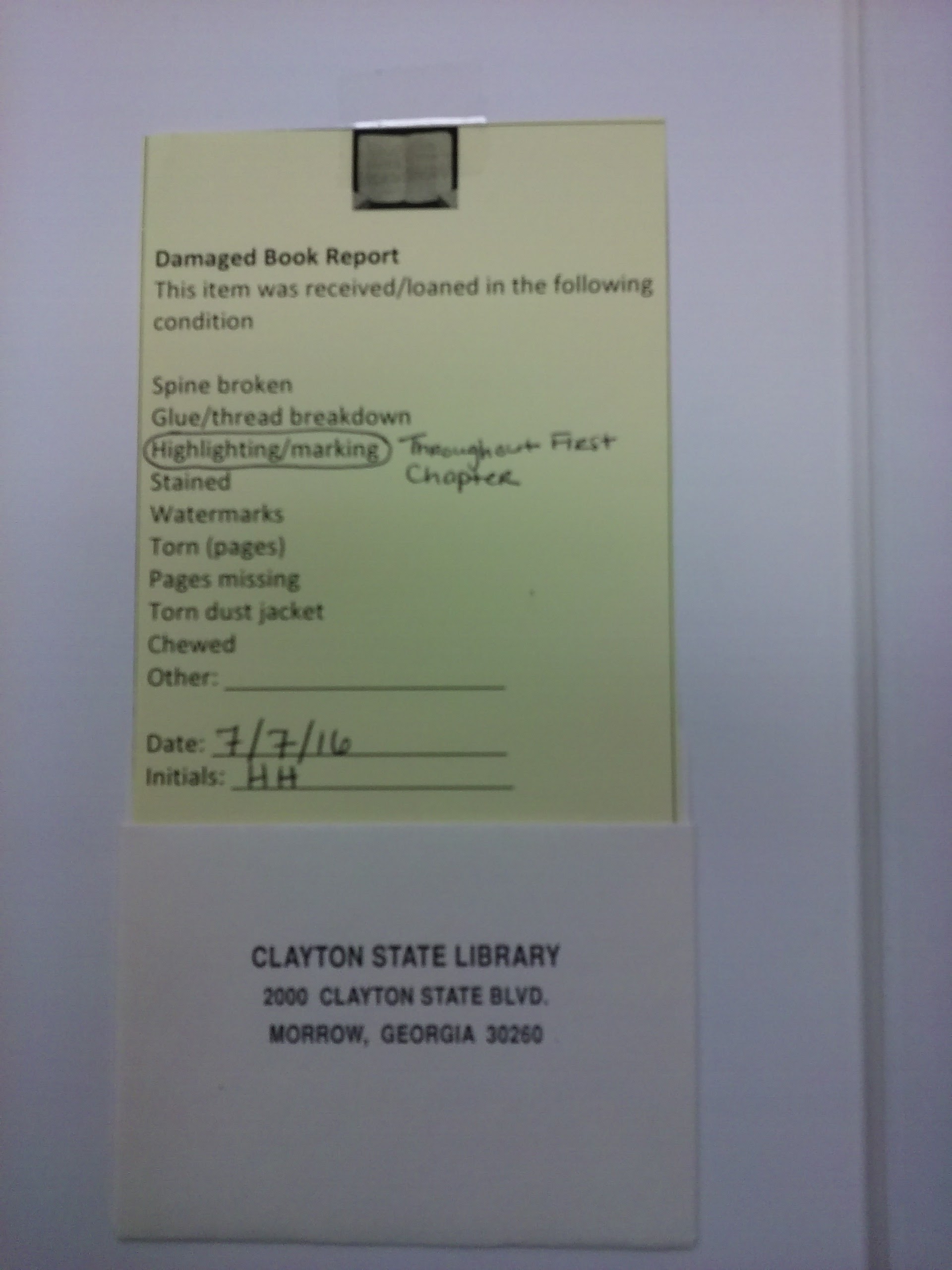
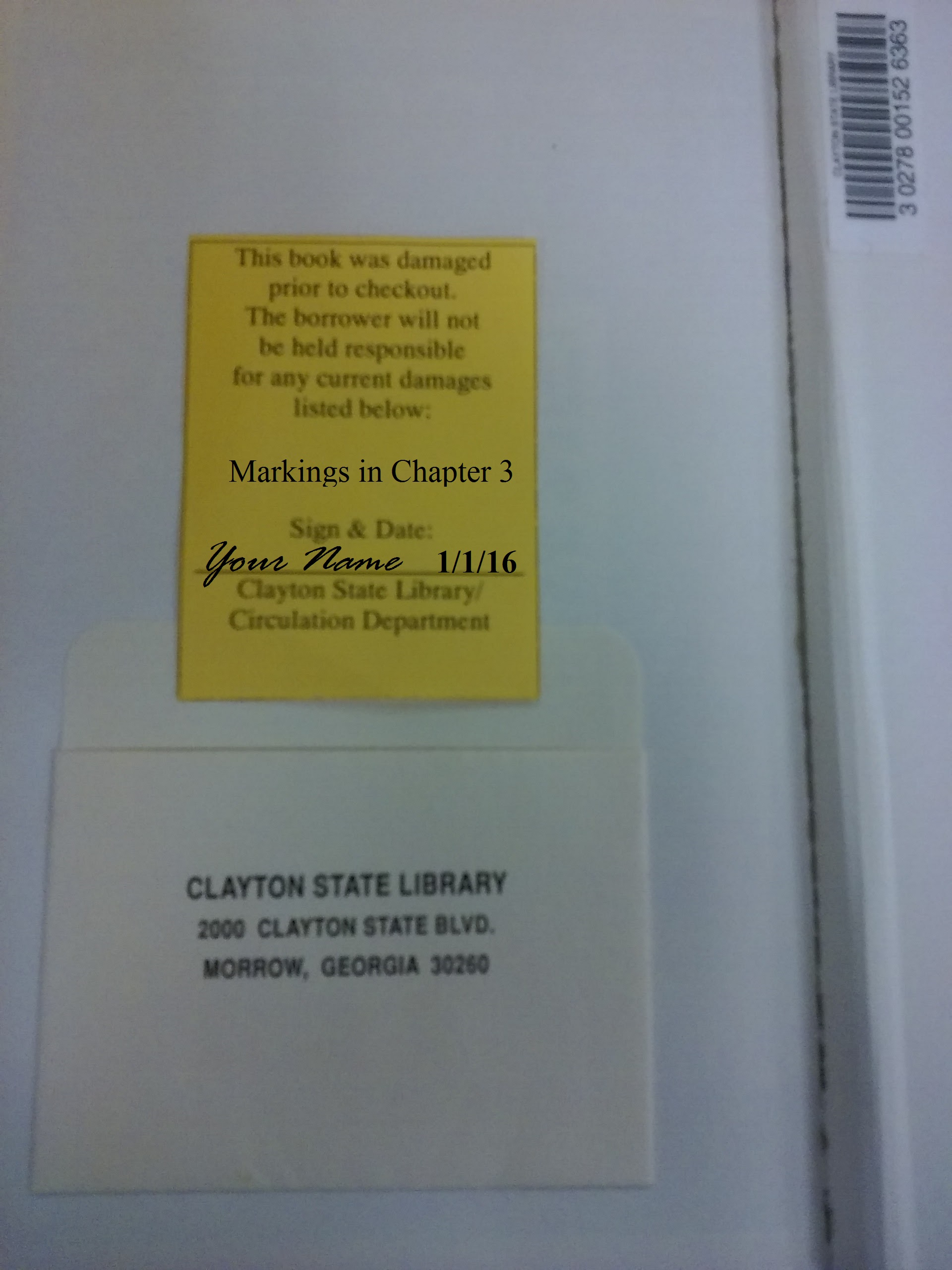
When charging a book that is damaged in any way (e.g., markings, water damage, pages torn, etc.), make sure you make note of the damage(s) on a yellow, prior damages sheet. Tape the sheet in the book on the inside of the back cover.

Again, we ask that you review the “Damaged Items” box at http://clayton.libguides.com/studentworker/tips to examine some examples of damaged items. If you do not know where the prior damages sheets are located, please ask.

Photos of the yellow, prior damages sheets:
 

Thank you,
Holly Hampton
HollyHampton@clayton.edu
(678) 466-4332

Wednesday, September 14, 2016

Fall Reminders

Hello Student Assistants,

We hope you all are having a great fall semester. To ensure we are all on the same page, we would like to share some reminders with you all:
  • You must shelve items throughout your shift. No items should be left on the Circulation cart at the end of your shift.
  • Please do not wear earbuds/earphones at the Circulation desk. You may wear them when shelving, reading, blocking, and straightening.
  • On the hourly checklist, do not initial next to tasks you have not completed.
  • Please check the printers for paper often as patrons will be printing frequently throughout the semester.  
  • Remember that the Circulation desk is a shared space – this includes the computers. We advise you to log out of any applications you may be logged into so that those who use the computer after you will not be able to access your information.
  • Please don’t forget to do your shelf reading. Your assigned shelves can be found in the “Student Tasks and Statistics” binder.
  • Anything you find yourself helping a patron with should be recorded in Ref. Analytics.
  • At the end of the day, move the hourly checklist to the binder’s back pocket.
  • Do not forget to record the gate count on the checklist and in Google Forms. It is important that this information is recorded both on paper and electronically.
  • When shelving multimedia material, audiovisual materials (DVDs, VHS tapes, CD-ROMs) go toward the front, closest to the office door. Audio materials (Audio CDs & Cassettes) go toward the back.
  • When charging and discharging materials, make sure the item has been fully charged or discharged. Sometimes the window may have gone away or a popup may prevent the charge/discharge from occurring.
  • Study Rooms:
    • Do not make, edit, or delete study room reservations. If a patron asks you to do this, ask a supervisor for assistance.
    • Do not allow people to leave the library with the study room key. Let them know that you will hold onto it until they return.
    • Remember that two people must be present to use a study room.
    • Before checking out the study room key, ask the patron for his/her ID and an electronic/hard copy of their confirmation.

If you have any questions, feel free to let me know.

Thank you,
Holly Hampton
(678) 466-4332

Sunday, June 19, 2016

Circulation Desk Reminders

Student Assistants,

Please keep the following things in mind as you work:
  • You must shelve items throughout your shift. No items should be left on the Circulation cart at the end of your shift.
  • Before closing, remember to check and see if any microfilm is in the Microfilm’s Return box to be returned to its proper location.
  • Refrain from eating at the front desk.
  • Keep conversations with patrons brief.
  • Do not leave the library building without permission. Make sure your supervisor knows where you are at all times.
  • You may keep phones at the desk, but keep usage of them to a minimum. If you receive a phone call, take it in the Circulation office and keep the conversation short (no longer than 2-3 minutes).
  • Starting fall semester, student assistants will no longer be allowed to wear earbuds/earphones at the Circulation desk. You may wear them when shelving, reading, blocking, and straightening. Since fall semester is our busiest time of the year, we want to focus more on our patrons, not earbuds.
  • When completing the hourly checklist, do not just take the headcount and sit down. Go through the entire checklist. The tasks that you do not have to do EVERY hour are “Stock SP printers” and “Straighten circ. Desk.” Printers should be checked at least three times each day and the Circulation desk should be straightened as needed.
  • Drop boxes should be checked both in the morning and at night.
  • Anything you find yourself helping a patron with should be recorded in Ref. Analytics. This includes anything from “Where is the restroom?” and “I need help finding a book” to “I need to check out a study room” and “Can you help me with the Microfilm Reader?”
  • Record your initials next to each task you completed on the “Student Assistant Job Duties and Responsibilities” checklist. This includes the Daily and Weekly portions.
  • The supplies in the SmartPrint room need to be stocked weekly. You should be able to flip through previous checklists to see if anyone has completed this task. You may also physically check the supplies when you are in the room stocking the printer or after assisting a patron with the printer or copier/scanner.
  • Study Rooms:
    • Do not allow people to leave the library with the study room key. Let them know that you will hold on to it until they return.
    • Remember that two people must be present to use a study room.
    • Before checking out the study room key, ask the patron for his/her ID and an electronic/hard copy of their confirmation. If the patron didn't receive an email confirmation, ask if you could give their name and information to the IT Department to find out why they didn't receive an email, and then give the patron a copy of the study room guidelines.
  • At the start of your shift, complete the following tasks:
1.       Clock in (ADP)
2.       Check Circulation Station blog for updates. (You should receive emails when new posts are added to the blog. If you don’t, please let Holly know.)
3.       Log in to LibApps so that you can access Ref. Analytics.
4.       Perform all tasks on the hourly checklist

A verbal and written warning will be made as necessary. If the behavior is not corrected in a given time frame, you will be dismissed.

Use your resources:
Lots of the situations you may encounter have been outlined for you in many forms. The “How Do I” manual, Circulation Student Assistant LibGuide, Clayton State Library website, and more are all there to help you better understand how to handle day-to-day Circulation desk functions. We ask that you review and familiarize yourself with these resources so that you are able to assist patrons with confidence and ease.

Please note that the Circulation Student Assistant LibGuide is updated frequently; thus, we advise you to check it regularly for new information as it is all there for you to be able to be a successful Circulation Student Assistant.
Circulation Student Assistant LibGuide Updates: Added a link to the FAQs – Read over the FAQs as it contains questions you may hear often when working at the Circulation desk. Added “Equipment” and “Study Rooms” tabs containing a visual of the checklists – Use this to quickly access the Study Room and Equipment (includes Laptops) policies and procedures. Added a feedback form on the bottom of the “Home” and “Contacts” tabs so that you can easily fill out and submit any feedback, suggestions, or notes you have for us. You may also use this to report any suggestions or feedback you hear while interacting with patrons at the desk.


Thank You