Tuesday, October 25, 2016

Damaged Items

Hello Student Assistants,

We recently encountered an issue in which an item was returned to us in an extremely damaged condition. Due to this incident, we ask that you all review how to handle damaged items, both being checked out and returned. You can find this information in the “Damaged Items” box on the LibGuide at http://clayton.libguides.com/studentworker/tips. I will also include some of the information below but advise you to look over the LibGuide as well as there are pictures accompanying this information.

If an item is returned damaged in any way, do not discharge it. Alert one of your supervisors.
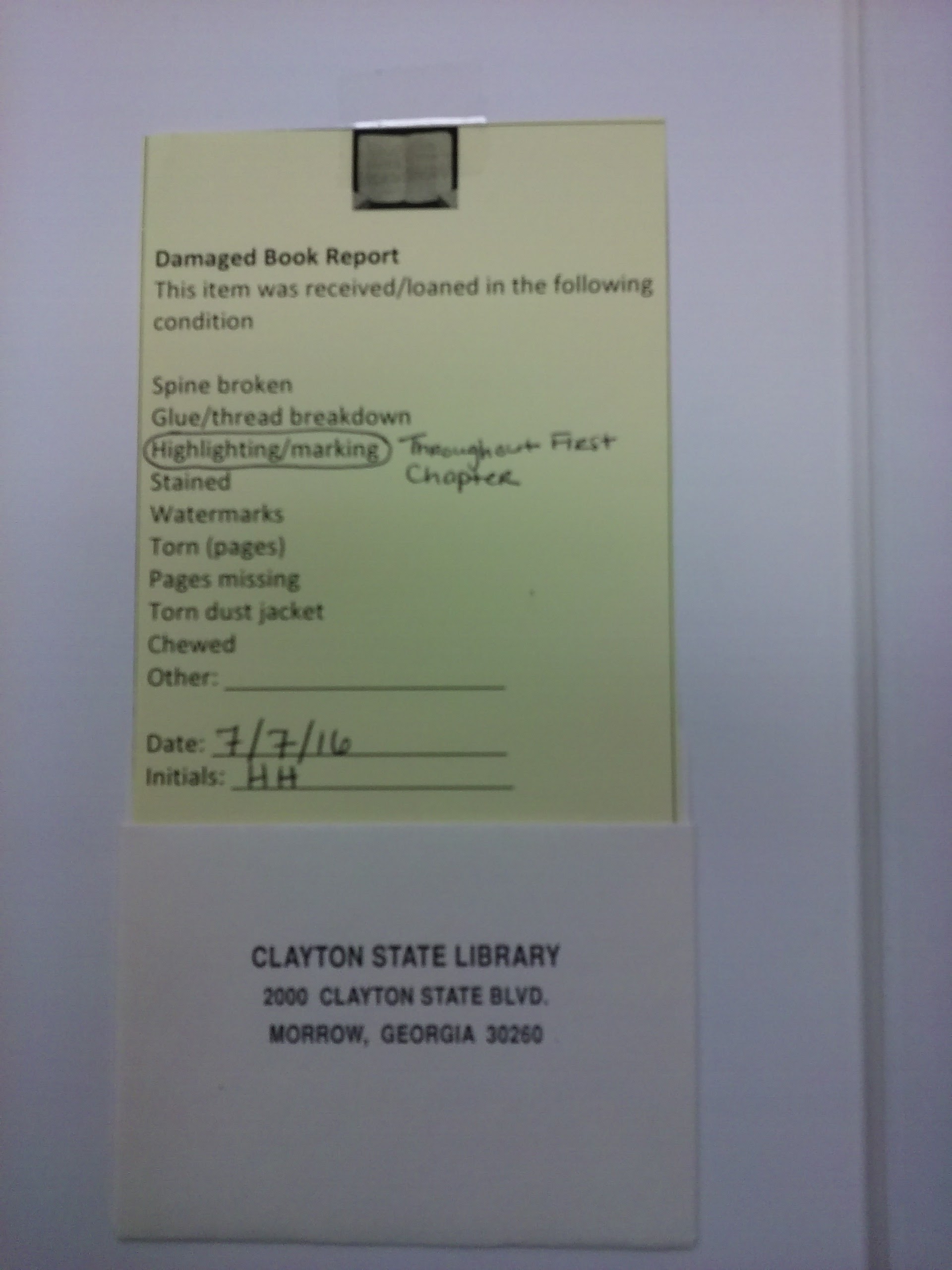
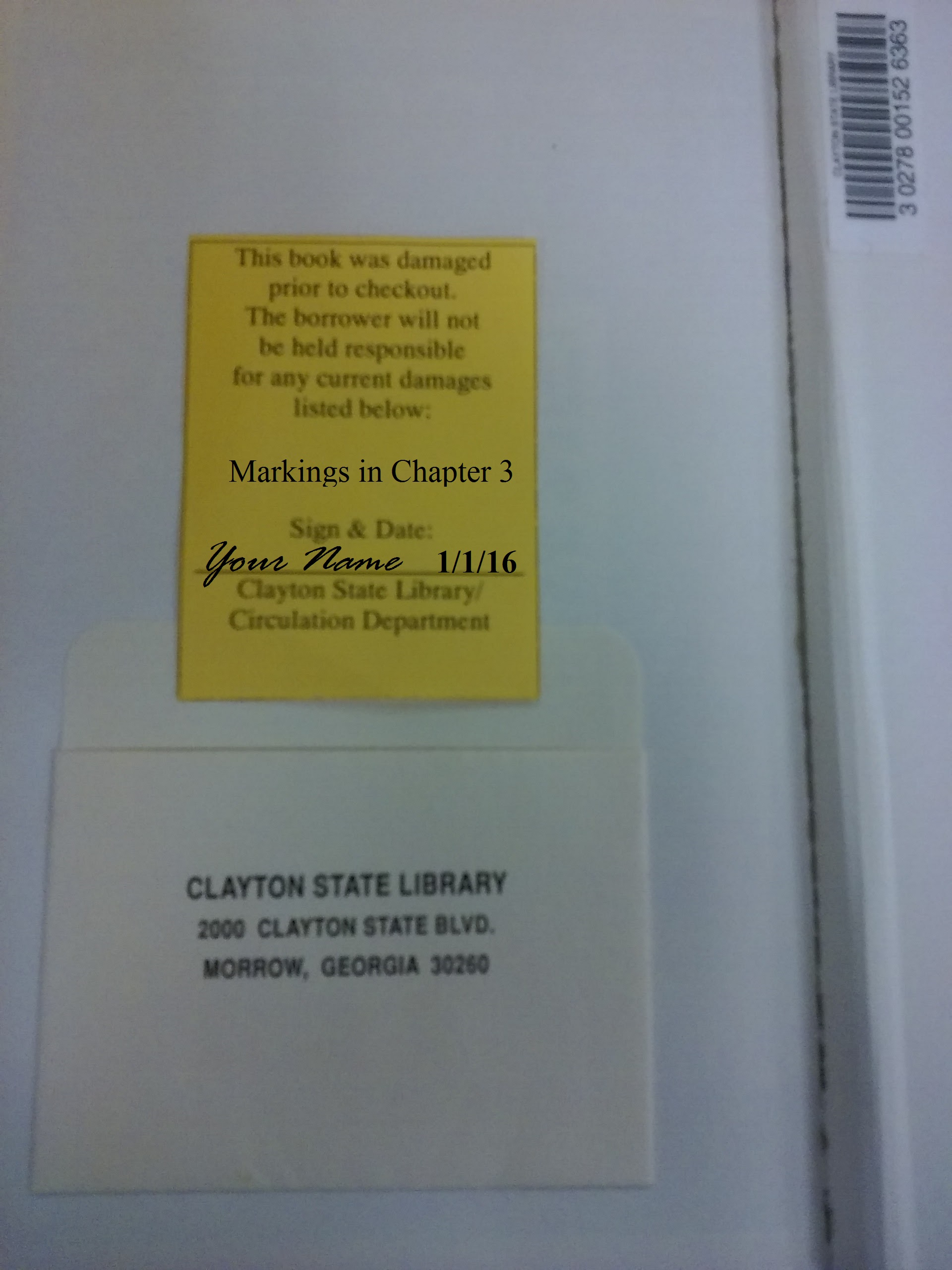
When charging a book that is damaged in any way (e.g., markings, water damage, pages torn, etc.), make sure you make note of the damage(s) on a yellow, prior damages sheet. Tape the sheet in the book on the inside of the back cover.

Again, we ask that you review the “Damaged Items” box at http://clayton.libguides.com/studentworker/tips to examine some examples of damaged items. If you do not know where the prior damages sheets are located, please ask.

Photos of the yellow, prior damages sheets:
 

Thank you,
Holly Hampton
HollyHampton@clayton.edu
(678) 466-4332

Sunday, October 16, 2016

Workflow Update

Hello Student Assistants,

We have a task to add to our nightly workflow. The chairs must be placed on the tables cushion side down every Monday and Wednesday night as custodial has begun vacuuming the commons area of the Library department on both floors.  They will be doing this every Tuesday and Thursday morning from now until the end of the semester.  Please start placing the chairs on the tables at about 9pm with the empty seating and move accordingly as the patrons leave. 

Thank you,
Holly Hampton
(678) 466-4332

Monday, October 3, 2016

Procedures

Hello Student Assistants,

There are a couple of procedures that have been changed or are in need of reinforcement this week such as how we check out headphones and how to handle books on display. They are as follows:

Headphones
At each service desk, there are five headphones and a corresponding laminated sheet of barcodes. Each set of headphones is numbered on the earpieces with an orange number. That number will correspond with the number on the sheet of barcodes which you will use to check the item out to patrons.

Books on Display
Due to the number of books on display this past week, I would like to go over some procedures with you regarding shelving display items. When discharging a book that was on display, an “Item has a Temporary Location” box will pop up. Make sure you check the “Location” column of the discharge box to see where the item should be shelved. Books that go on the display should say “Display Case.” If you do not know which display these books go on, please bring these items to the back for Holly or Barbara to return to its designated location.
Note: Sometimes items on display are checked out and returned after the display is taken down. In this case, the temporary location needs to be removed. Thus, you will need to bring these items back to Holly or Barbara. 

LakerCard
Patrons must have their LakerCard or some form of picture ID on them in order to check out materials. Do not simply accept their LakerCard number or their name without a picture ID for proof that they are, in fact, associated with the name or number.

Lastly, a few reminders:
Push in chairs throughout your shift rather than just every hour. We want to keep the library looking orderly and clean.
Do not leave carts in or in front of an aisle – specifically the carts for transporting the dehumidifier buckets. When carts are in or in front of an aisle, they pose a fire hazard as they are blocking evacuation routes. Generally, they should be stored inside the empty shelving at the back of the compact shelving. The red cart for the dehumidifiers is kept in the back of the circulation office.
Remember to turn off both Circulation desk computers during closing.


Thank you,
Holly Hampton
(678) 466-4332

Tuesday, September 20, 2016

Laptops and UC Book Drop

Hello Student Assistants,

There are a few things I would like to address regarding laptop procedures:
  • When checking out a laptop, before recording existing damages to the laptop, make sure you check the sheet located on the front of the laptop cabinet. It lists the existing damages for each laptop for you. Do not write “none” before looking over this sheet. This sheet will be added to the LibGuide soon for easy access.
  • When placing a laptop in the cabinet, please place it so that the laptop number is facing out. This provides for more efficient work flow.
  • When a laptop is finished charging, feel free to move it over to the green side of the cabinet to indicate that it is ready to be checked out.


I also wanted to address the issue we have been having with the book drop by Jazzman’s (the “UC Book Drop”). There have been instances of trash being found in the book drop. In an effort to reduce this from occurring, a sign has been temporarily placed on top of the book drop. Thus, we ask that you pick up the sign before lifting and opening the book drop to remove any books to avoid damage being done to the sign.

That is all for now. Please let us know if you have any questions of concerns.

Thank you,
Holly Hampton
(678) 466-4332

Wednesday, September 14, 2016

Fall Reminders

Hello Student Assistants,

We hope you all are having a great fall semester. To ensure we are all on the same page, we would like to share some reminders with you all:
  • You must shelve items throughout your shift. No items should be left on the Circulation cart at the end of your shift.
  • Please do not wear earbuds/earphones at the Circulation desk. You may wear them when shelving, reading, blocking, and straightening.
  • On the hourly checklist, do not initial next to tasks you have not completed.
  • Please check the printers for paper often as patrons will be printing frequently throughout the semester.  
  • Remember that the Circulation desk is a shared space – this includes the computers. We advise you to log out of any applications you may be logged into so that those who use the computer after you will not be able to access your information.
  • Please don’t forget to do your shelf reading. Your assigned shelves can be found in the “Student Tasks and Statistics” binder.
  • Anything you find yourself helping a patron with should be recorded in Ref. Analytics.
  • At the end of the day, move the hourly checklist to the binder’s back pocket.
  • Do not forget to record the gate count on the checklist and in Google Forms. It is important that this information is recorded both on paper and electronically.
  • When shelving multimedia material, audiovisual materials (DVDs, VHS tapes, CD-ROMs) go toward the front, closest to the office door. Audio materials (Audio CDs & Cassettes) go toward the back.
  • When charging and discharging materials, make sure the item has been fully charged or discharged. Sometimes the window may have gone away or a popup may prevent the charge/discharge from occurring.
  • Study Rooms:
    • Do not make, edit, or delete study room reservations. If a patron asks you to do this, ask a supervisor for assistance.
    • Do not allow people to leave the library with the study room key. Let them know that you will hold onto it until they return.
    • Remember that two people must be present to use a study room.
    • Before checking out the study room key, ask the patron for his/her ID and an electronic/hard copy of their confirmation.

If you have any questions, feel free to let me know.

Thank you,
Holly Hampton
(678) 466-4332

Saturday, August 13, 2016

Welcome Week Scavenger Hunt

Hello Student Assistants,

We are happy to announce the start of the fall semester! With the start of a new semester comes a new "Welcome Week." 

From August 13 – 20th, we will be participating in Welcome Week. For Welcome Week, students have the chance to participate in a self-guided scavenger hunt here at Clayton State Library. The hunt consists of QR codes that people can scan with their mobile device. If they do not have a QR code scanner on their mobile device, they can type the link into a browser. If they do not have a mobile device available, they can use one of our computers or check out a laptop.

The scavenger hunt will lead them to various places within the library as the goal is for people to learn about the library. If a scavenger hunt participant asks for your help solving and finding clues, please help them as much as you can and take this opportunity to show them various services we offer; for example, if a clue leads to a book and they need your help finding the book, please take the opportunity to demonstrate the catalog and shelving.

The final clue leads to Course Reserves. When a hunter comes to the desk to ask for the course reserves item for the Welcome Week hunt, give them a button (while supplies last) and a raffle entry form. Place all completed raffle entry forms in the manila envelope labeled “Gosling Hunt Entry Forms COMPLETED.”

Let us know if you have any questions. An info/tips sheet and a list of the clues and where they lead can be found either on the Circulation Desk or with the scavenger hunt items on the Course Reserves shelf.

Note: Except for the first clue, the QR codes and URLs are on laminated geese hidden in the target locations. It is very important that the geese stay where they are so that other hunters are able to obtain the next clue.

Thank you,
Holly Hampton
(678) 466-4332


Tuesday, June 28, 2016

Independence Day

Student Assistants, 

The library will be closed July 2nd-4th in observance of Independence Day. We will reopen Tuesday, July 5th with our regular hours, 8am – 9pm. We hope you have a happy and safe Fourth of July!


Thank you,
Holly Hampton
(678) 466-4332